Few, if any, users will say that they have too much screen real estate. There’s always one more window you’d like to open, or you’ll often wish you could see just a little more of a game environment. To this end, many people run two or three of the best gaming monitors together. This approach solves many problems, and if you go for something common like a 27-inch QHD, the price isn’t too high. But there’s one thing you can’t escape: the dividing line.
Monitors always have a frame; even the flush ones are visible. And no one will say that they like the line. It can perhaps be ignored, but it doesn’t just magically disappear. The simplest solution is to go for an ultra-wide display. If you’re currently running two 27-inch QHD monitors, you can replace them with a single 49-inch 32:9 panel. Add a curve, and you have a screen that’s great for productivity, gaming, and simulation.
This isn’t necessarily the least expensive solution, but if you buy one from Deco Gear, you can put the DG49OLED240 on your desk for $1,230. That will get you 5120x1440 pixels, a Quantum Dot OLED panel, 240 Hz, Adaptive-Sync, HDR400, and wide gamut color. Let’s take a look.
Deco Gear DG49OLED240 Specs
Panel Type / Backlight | Quantum Dot Organic Light Emitting Diode (QD-OLED) |
Screen Size / Aspect Ratio | 49 inches / 32:9 |
Curve radius: 1800mm | |
Max Resolution and Refresh Rate | 5120x1440 @ 240 Hz |
FreeSync and G-Sync Compatible | |
Native Color Depth and Gamut | 10-bit / DCI-P3+ |
HDR10, DisplayHDR 400 | |
Response Time (GTG) | 0.03ms |
Brightness (mfr) | 250 nits SDR |
400 nits HDR | |
Contrast | Unmeasurable |
Speakers | 2x 5w + 1x 10w |
Video Inputs | 2x DisplayPort 1.4 |
1x HDMI 2.1, 1x USB-C | |
Audio | 3.5mm headphone output |
USB 3.0 | 1x up, 2x down or None |
Power Consumption | 71w, brightness @ 200 nits |
Panel Dimensions WxHxD w/base | 47.2 x 17.6-22.2 x 14.2 inches (735 x 447-564 x 240mm) |
Panel Thickness | 6.7 inches (170mm) |
Bezel Width | Top/sides: 0.47 inch (12mm) |
Bottom: 0.59 inch (15mm) | |
Weight | 20.9 pounds (9.5kg) |
Warranty | 1 year |
The 49-inch 32:9 display format is the exact equivalent of two 27-inch 16:9 QHD screens; it’s the perfect solution for those who would otherwise run two monitors. The only downside is that it costs more than two 27-inch QHD panels. But given the specs in play here, the DG49OLED240 delivers a lot for the money.
With Quantum Dot color, you get a healthy 112% coverage of DCI-P3. That’s more than many 34-inch 21:9 screens I’ve reviewed. It’s reasonably accurate out of the box as well. My sample measured well before calibration and better after a few adjustments.
Light output is around 430 nits for SDR and HDR content. That’s with variable brightness engaged and measurement of a 25% window pattern. Full field white comes in around 360 nits. The DG49OLED240 provides more than enough brightness for impactful HDR in an indoor space with some ambient light. It also plays well in the dark with lower levels that maintain full color and contrast.
Video processing is excellent in all respects with a 240 Hz refresh rate and Adaptive-Sync. I measured panel response on par with other OLEDs and lower input lag than other 49-inch 32:9 screens in my test database.
Gaming is enhanced by a pair of internal five-watt speakers accompanied by a 10-watt woofer plus a 3.5mm headphone jack. And you can hang those cans on a stout metal hook that flips out from the stand. Video inputs include two DisplayPort 1.4, one HDMI 2.1, and a USB-C that includes 90 watts of charging power. Additional USB ports support things like input devices and webcams. You also get LED lighting in the back with control in the OSD.
If you’re wondering about the Deco Gear brand, it is a subsidiary of Beach Camera, a very experienced vendor of electronics and technology. You can buy the DG49OLED240 directly for $1,229.99, or in one of Beach Camera’s brick-and-mortar locations.
Assembly and Accessories
The DG49OLED240 showed up in a large white carton with just the words “49” OLED Ultrawide Monitor” printed on it. A visit to Deco Gear’s website revealed that several variants of this display differ mainly by refresh rate. The DG49OLED240 is the flagship model at 240 Hz. The contents are packed in crumbly foam and assembled tool-free. The accessory bundle includes an IEC cord for the internal power supply plus DisplayPort, HDMI and USB cables.
Product 360
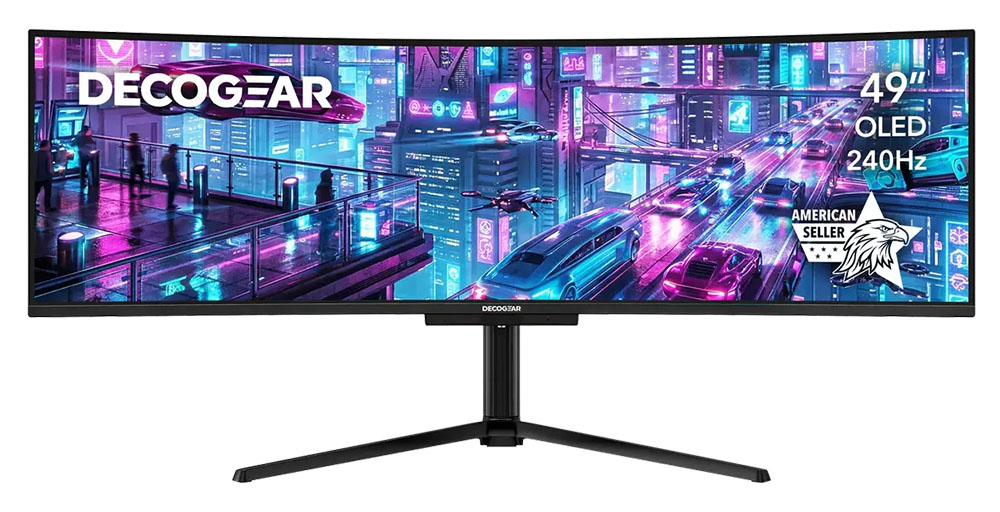
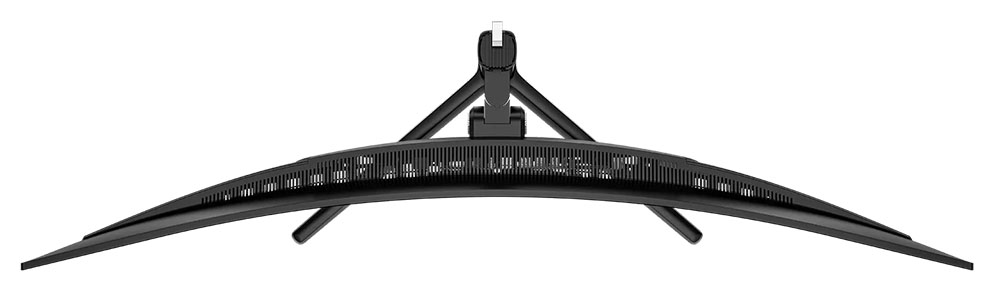
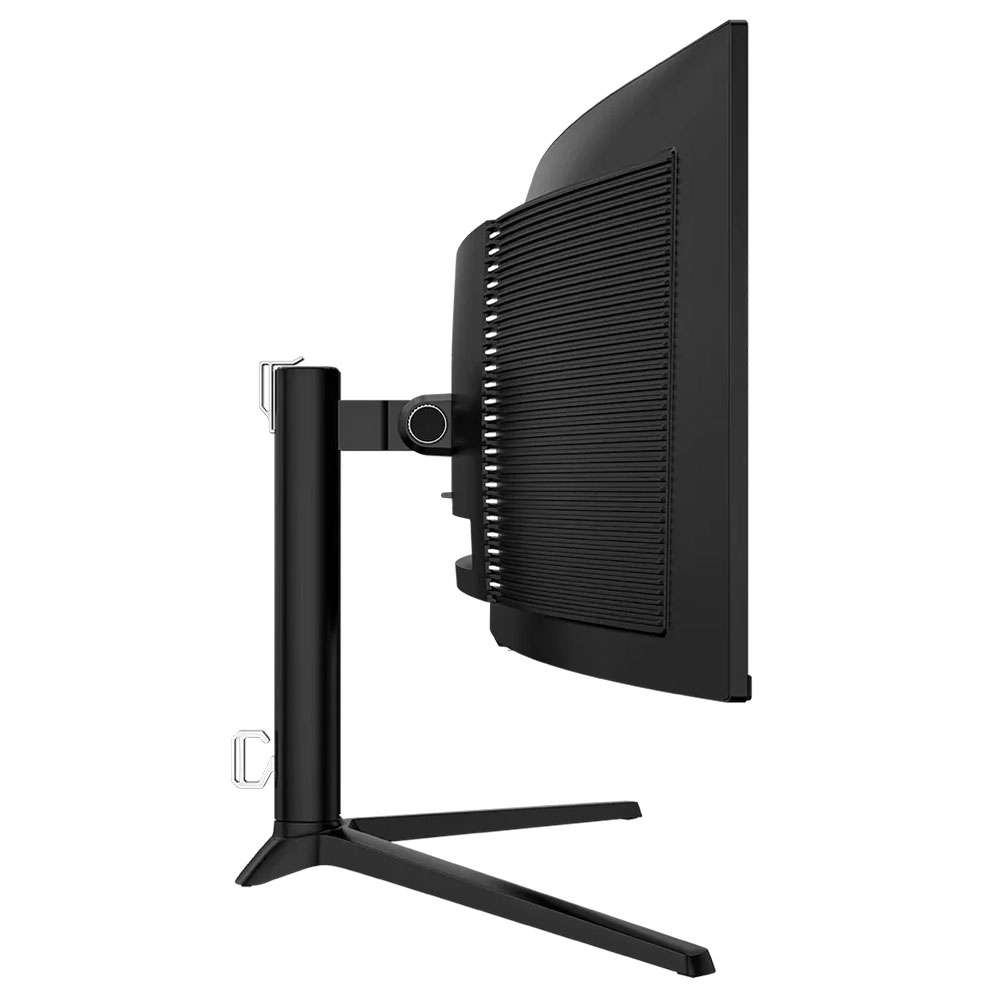
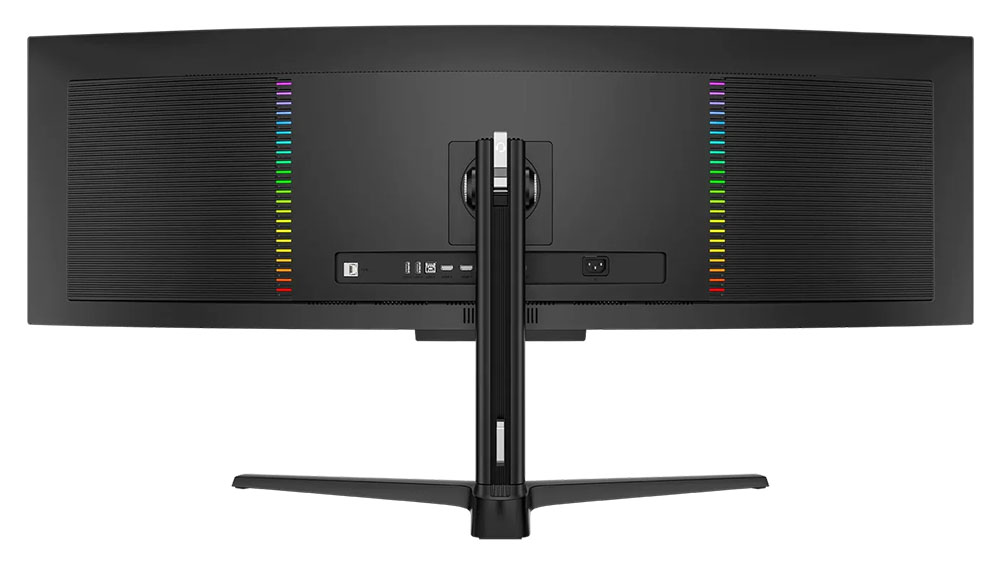
The DG49OLED240 is styled simply with just a Deco Gear logo on the front, screened on above a small protrusion. This is where you’ll find the only control, a tiny joystick. It covers all monitor functions. A word of warning: pressing it only toggles power. It doesn’t select functions like every other joystick on every other monitor. So, unless you plan to turn the DG49OLED240 on or off, do not press it.
The screen’s bezel is flush so you can’t see it when the power’s off. But it is a tad wider than average at 12mm around the top and sides and 15mm at the bottom. In practice though, you’ll be so glad to get rid of the line down the center after chucking your two 27-inch screens that you won’t care.
The stand is super solid with a wide and deep base made from cast aluminum and finished in a matte black powdercoat. It’s almost monolithic, but there is a bit of wobble where the panel snaps on. This is typical of super wide monitors. Ergonomics include a 4.6-inch height range plus 5/20 degrees tilt and 20 degrees swivel.
In the back are LED lights in two vertical arrays that frame the rear-facing I/O panel. There are two DisplayPort 1.4s and an HDMI 2.1. A USB-C handles video signals and provides 90 watts of power. There are USB ports too, one upstream and two downstream. A 3.5mm headphone jack delivers audio, and there’s an RJ-45 network port.
OSD Features
The DG49OLED240’s OSD is somewhat frustrating to control because the joystick doesn’t work the same way as nearly every other monitor I’ve encountered. One major issue I had was that pressing it toggles the power no matter what menu you’re currently in. I lost count of how many times I accidentally turned off my review sample. To select a function, right-click. To back out of the menu, left-click. Once I got the hang of it, I was able to find everything I needed for image control and video processing.
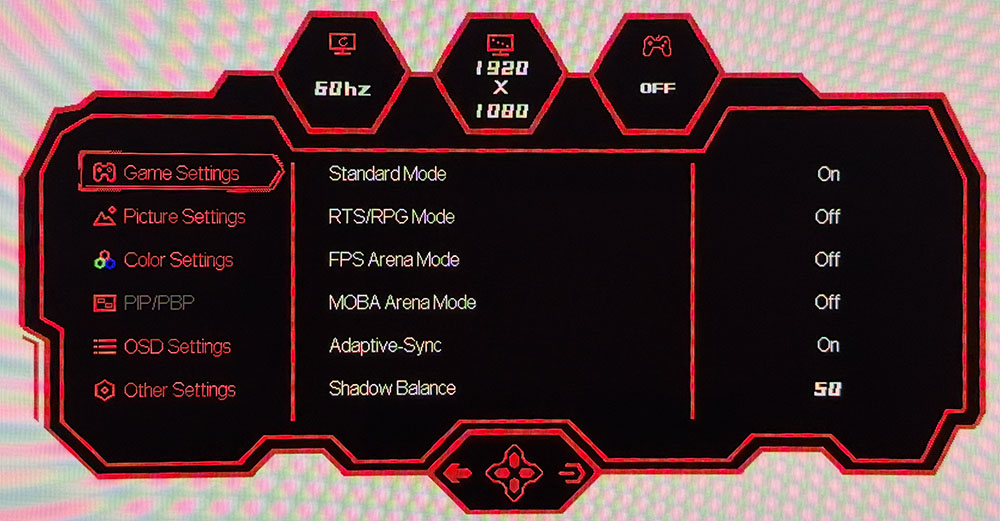
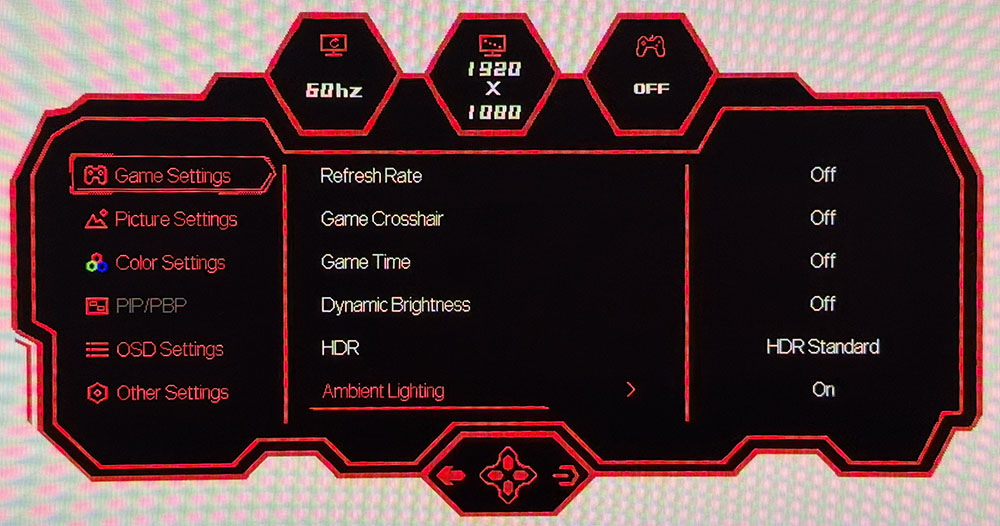
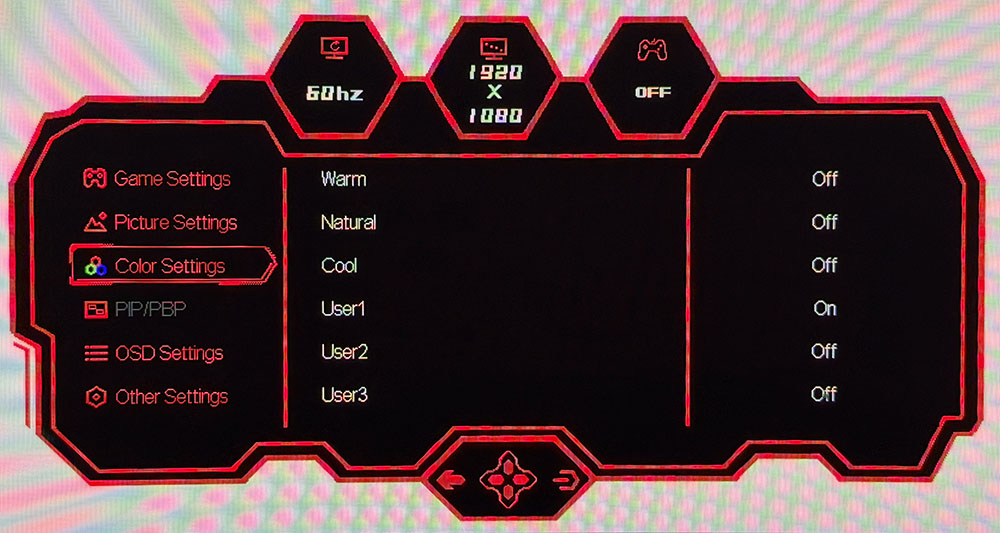
Every menu screen has basic signal information at the top in three small portholes. The menu graphics are game-focused with a purposeful red border on a black background. Game Settings is up first with four image modes, an Adaptive-Sync toggle, and Shadow Balance, which brightens darker areas for better visibility. On the second screen, you get a frame counter, two aiming points, and a timer. Dynamic Brightness is a global dimming feature. HDR can be turned off or engaged with two different modes. Ambient Lighting refers to the LEDs on the back.
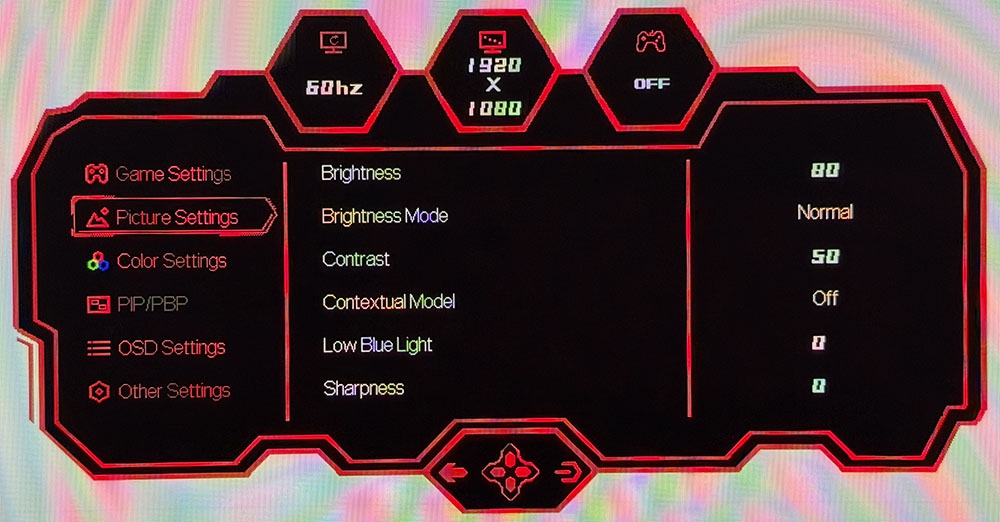
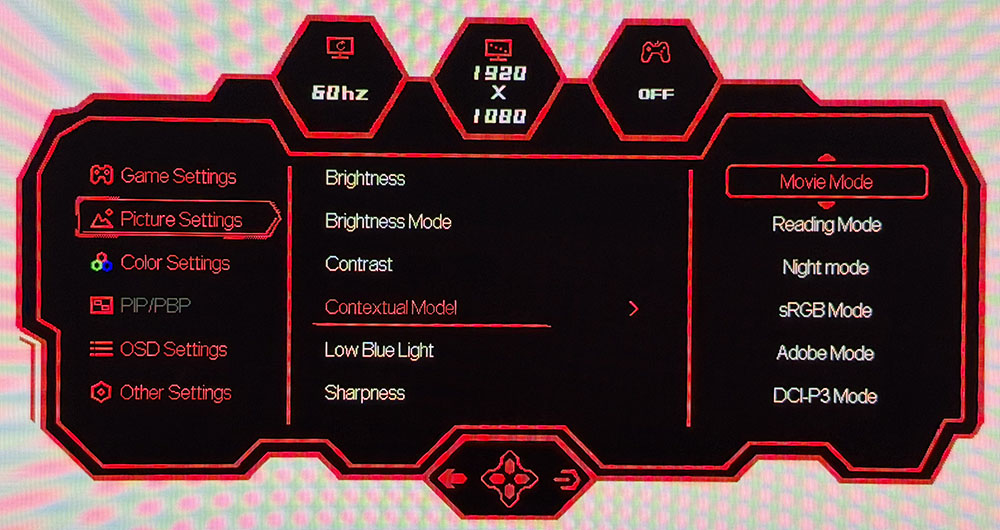
Picture Settings has the usual basic controls and an unusual one called Contextual Model. I don’t know where this terminology comes from, but here, it means more picture modes. Specifically, this is where you’ll find sRGB along with other activity-specific options. An important one here is Brightness Mode. Deco Gear calls the two settings Normal and Highlight, and what they actually are is fixed or variable brightness. I’ll talk more about that later. The second screen, not shown above, has six gamma presets.
In Color Settings, you get three fixed color temps plus three more user memories with RGB sliders. These are difficult to adjust thanks to the joystick’s unusual operation. But they are effective and allowed me to dial in grayscale tracking to a very accurate level.
Additional settings include PIP/PBP for viewing two video sources at once. You can adjust the position of the OSD, and there are port version options. The one thing I didn’t find was OLED care options. But Deco Gear assures me that the DG49OLED240 has automated logo dimming and panel refresh, which runs every few hours to guard against burn-in.
Deco Gear DG49OLED240 Calibration Settings
The DG49OLED240 can be calibrated in its Standard picture mode, which uses the full native color gamut, 112% of DCI-P3. There are three user color temps with RGB sliders that helped me get grayscale tracking from good to great. Gamma runs a tad dark but tracks close to the 2.2 reference. For sRGB color, go to the menu called Contextual Model and select it from the options there. You can also specify Adobe RGB or P3 color. There is a variable brightness option as well called Brightness Mode. For fixed, choose Normal and for variable, choose Highlight. I’ve included brightness values for both modes in my settings list below.
HDR signals get two modes that vary only in their EOTF tracking. The best choice there is HDR Standard.
Picture Mode | Standard |
Brightness Mode | Normal / Highlight |
Brightness 200 nits | 79 / 45 |
Brightness 120 nits | 47 / 25 |
Brightness 100 nits | 39 / 20 |
Brightness 80 nits | 30 / 16 |
Brightness 50 nits | 18 / 8 (min. 10 / 17 nits) |
Contrast | 50 |
Gamma | 2.2 |
Color Temp User | Red 49, Green 49, Blue 50 |
Gaming and Hands-on
Gaming on the DG49OLED240 was instantly addictive. It delivered very balanced performance with perfect motion resolution, lighting-fast reflexes, and a gorgeous image. The extra width provided by the 32:9 aspect ratio really drew me into the gaming environment with a VR-like feel that enveloped my peripheral vision.
You’ll see on the next page that the DG49OLED240 has a tad less input lag than the other 49-inch OLEDs I’ve reviewed. Though the numerical difference is small, I experienced a quickness and precision that I don’t get with every OLED. Clearly, 240 Hz is more than enough speed to ensure blur-free operation and instant control response. A seasoned competitor will want to give this monitor serious consideration. And I had no problem maintaining 240 fps on a GeForce RTX 4090 in Doom Eternal with detail set at maximum in HDR mode.
The DG49OLED240 also has exceptional color balance. Even though it covers more than 112% of DCI-P3, it never looked overblown in SDR mode. There is an available and accurate sRGB mode, but I only needed it when working on photos and graphics for web publication. For all other activities, including watching SDR video, I enjoyed the extra color. And HDR looked stunning thanks to linear saturation tracking and no visible hue errors.
With the same 109 ppi as a 27-inch QHD screen, clarity is excellent but not quite at the level of a 4K screen. It is more than sharp enough for gaming though. Documents also render with clean fonts, no apparent fringing, and that signature OLED contrast. I found smooth scrolling in Windows by running at 120 Hz. You can certainly run at 240 Hz all the time if you wish, but it will increase power consumption.
Putting a monitor as wide as the DG49OLED240 on your desk will require some adaptation if you aren’t already used to multiple screens. I habitually put the work I’m focusing on at the center of the screen, but with a mega-wide, I had to spend more time with pages to my left and right. Photoshop was my favorite use since I could put the photo in the center and leave the sides for toolbars and supporting dialog boxes. It’s also great for very wide spreadsheets, like my monitor test database which has 25 horizontal fields. For my work, it is less suited to writing since I prefer more height when using Word or Notepad.
A standout feature I noticed immediately was the DG49OLED240’s excellent audio quality. It has a pair of internal speakers which alone are not extraordinary, but they are accompanied by a 10-watt woofer which rounds out the bass frequencies. This makes the sound presentation much fuller and more realistic. It adds to the screen’s immersive quality and is a completely viable alternative to headphones or external desktop speakers.
Takeaway: The DG49OLED240 delivers gaming performance on par with the best OLED screens I’ve reviewed. It has perfect motion resolution and responds instantly to control inputs with less lag than other 49-inch monitors. It’s super useful for workday tasks like Photoshop and Excel and not quite as well suited to word processing or web browsing. Sound quality is equivalent to a good pair of headphones or external desktop speakers. If you’re looking to get rid of the line between your two 27-inch QHD monitors, the DG49OLED240 is a no-brainer.
MORE: Best Gaming Monitors
MORE: How We Test PC Monitors
MORE: How to Buy a PC Monitor
To compare the DG49OLED240’s performance, I’ve lined up two other 49-inch 32:9 OLEDs, AOC’s PD49 and Philips’ 49M2C8900. The other screens are 34-inch 21:9s, Alienware’s AW3426DW, Acer’s X34 OLED, and Asus’ PG34WCDN. Refresh rates range from 240 to 360 Hz.
Pixel Response and Input Lag
Click here to read up on our pixel response and input lag testing procedures.
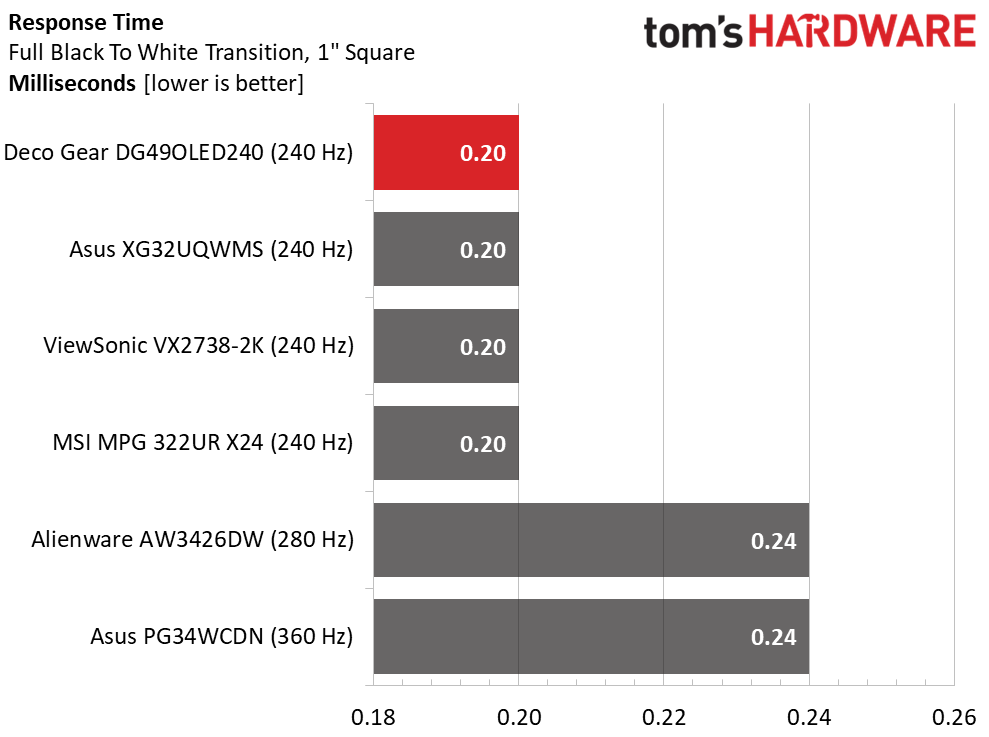
The response group is slightly different in that it includes ViewSonic and MSI monitors. This is because I’m still building up the number of screens tested by the Nvidia LDAT sensor. Its results cannot be compared to my previous test method of counting frames from a high-speed camera. It’s becoming evident that refresh rate has a smaller effect on performance in this test than with LCD panels. So far, the OLEDs I’ve tested have ranged from 0.12 to 0.24ms. And faster refresh rates don’t guarantee faster response. That said, a 0.12ms difference is well below the threshold of perception. No human being could tell them apart. The DG49OLED240 is super smooth, same as any OLED.
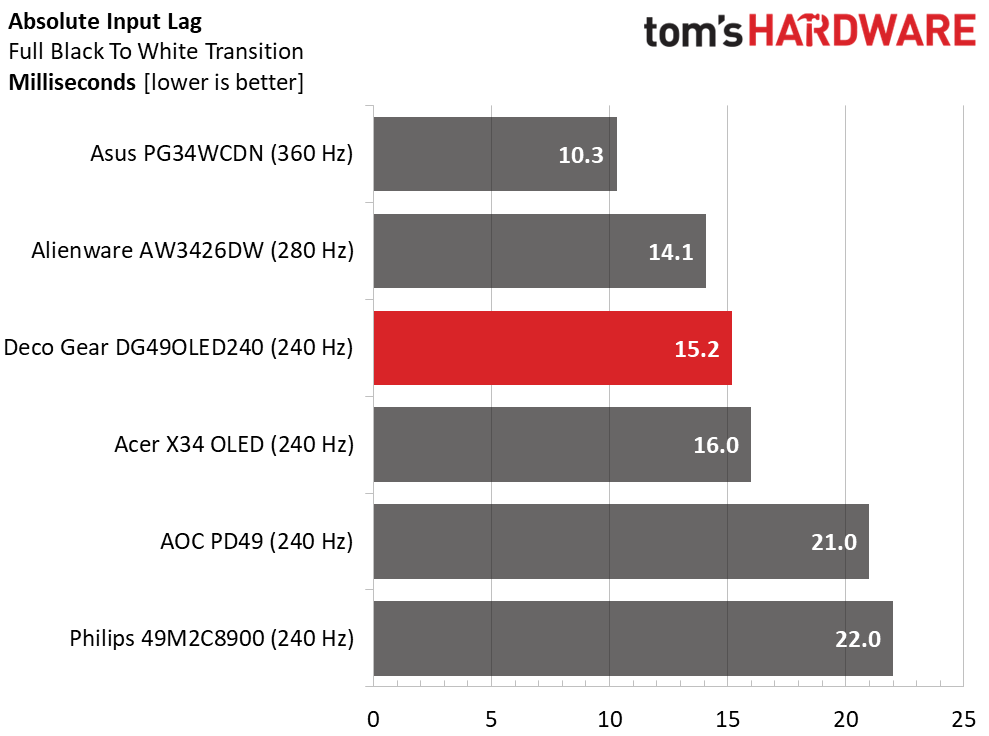
In the lag test, the DG49OLED240 does well with just 15.2ms averaged over 25 mouse clicks. It’s the quickest 49-inch monitor, and it’s a tad quicker than the Acer. Here, refresh rate does matter, though it's a tight race. The 360 Hz PG34WCDN is very fast at 10.3ms. But the DG49OLED240 is more than quick enough for gamers of all skill levels.
Test Takeaway: The DG49OLED240 provides low input lag and smooth motion resolution for all game types and play scenarios. It is on par with other OLEDs in the panel response test and has a bit less input lag than the other 49-inch 32:9 OLEDs I’ve tested. I found it completely addictive during gameplay with perfect motion resolution and instant control response.
Viewing Angles
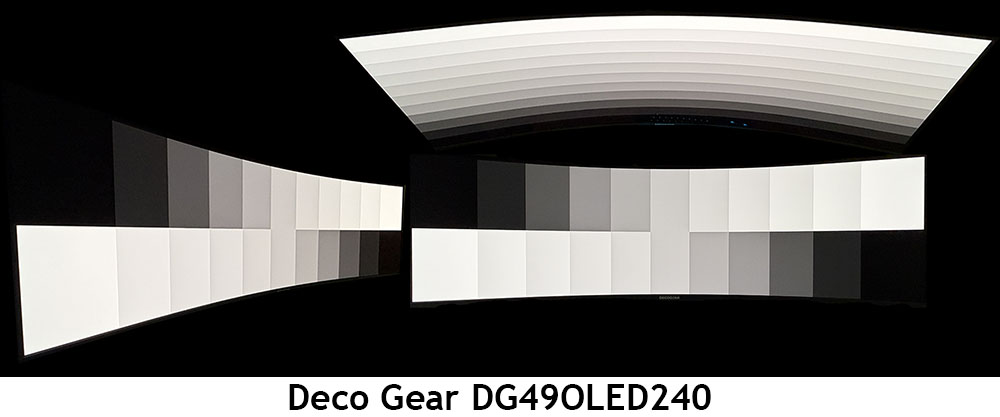
I’ve found that most Quantum Dot OLEDS show a slight tint at 45 degrees to the side. The DG49OLED240 has a red shift that’s just perceptible. There is no change to brightness or gamma, though, meaning you’ll have a hard time seeing a problem in actual content. The top view is also a bit red with a moderate reduction in gamma and brightness.
Screen Uniformity
To learn how we measure screen uniformity, click here.
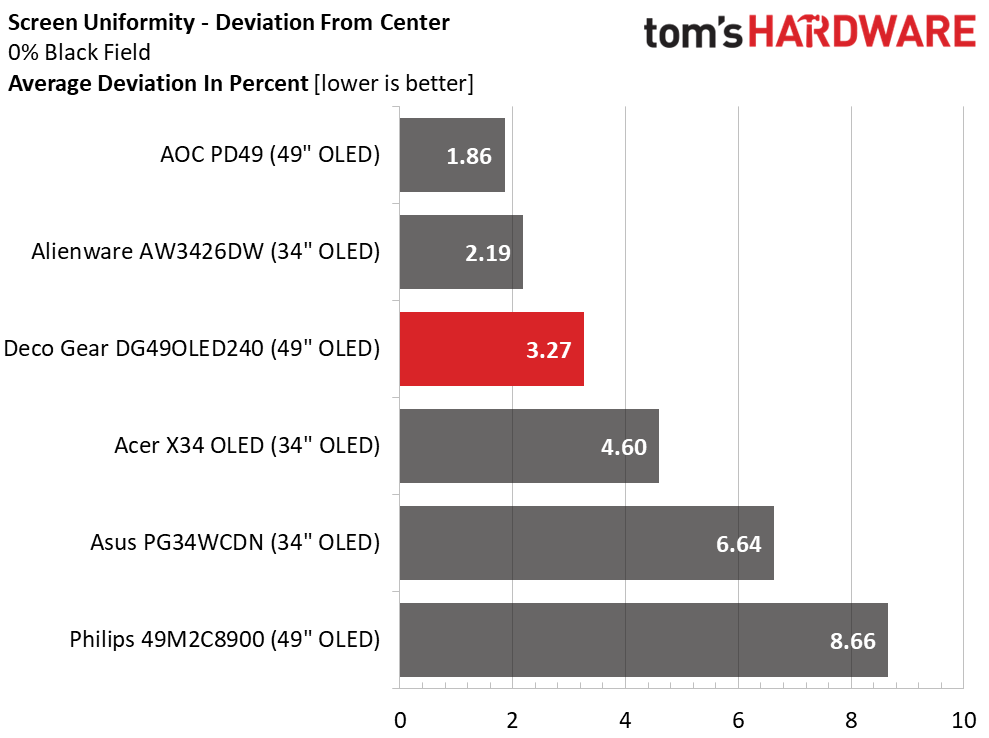
The DG49OLED240 aced my uniformity test with just 3.27% deviation from the center zone. This is well below the visible threshold of 10%. My sample had no issues whatsoever, no bleed, no glow, and no color variation in any full-field test pattern. This is excellent performance that is typical of the OLED monitors I’ve reviewed.
MORE: Best Gaming Monitors
MORE: How We Test PC Monitors
MORE: How to Buy a PC Monitor
To read about our monitor tests in-depth, please check out Display Testing Explained: How We Test PC Monitors. We cover brightness and contrast testing on page two.
Uncalibrated – Maximum Backlight Level
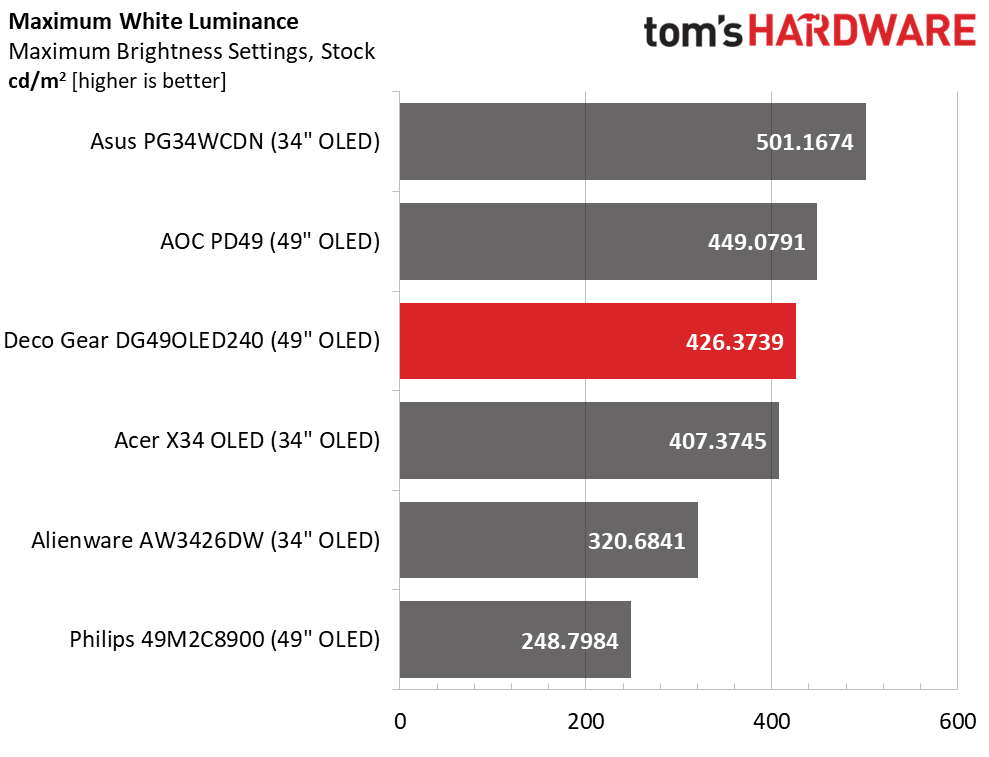
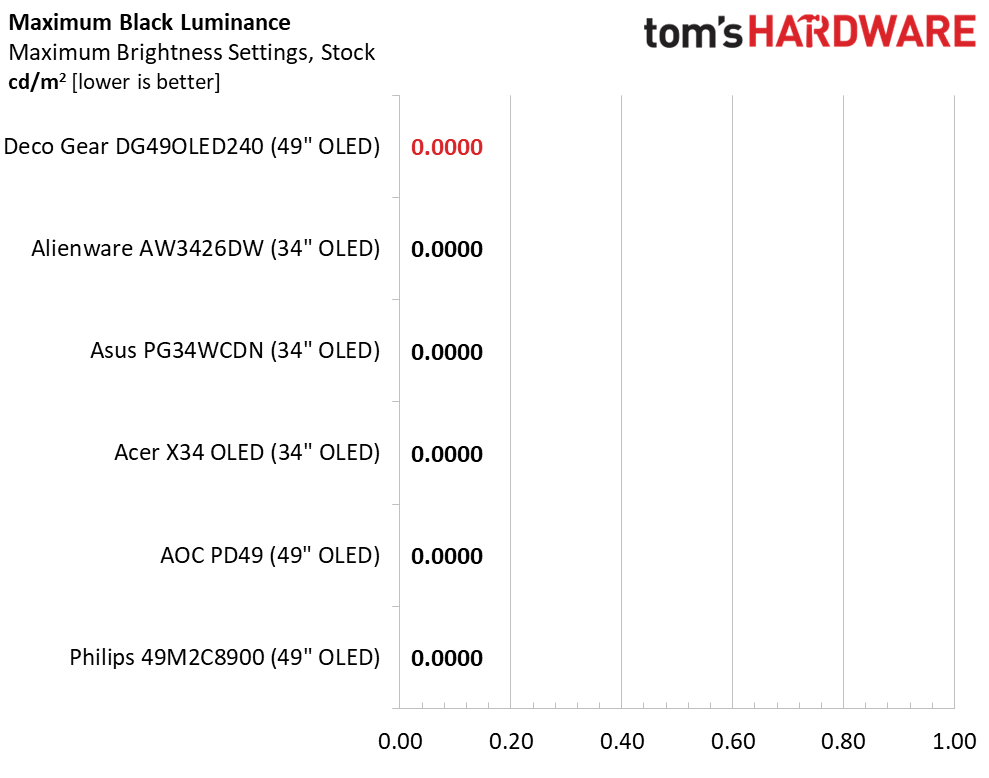
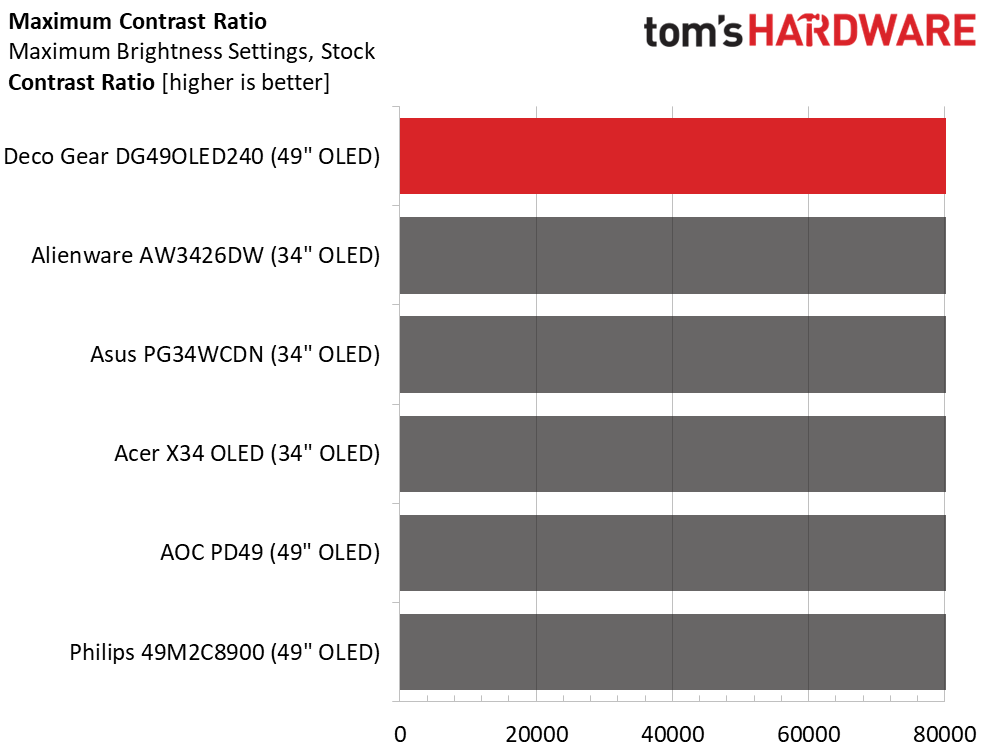
To get maximum brightness from the DG49OLED240 in SDR mode, I had to set Brightness Mode to Highlight, which corresponds to variable brightness. Measuring a 25% window gave me 426 nits, which is about average for the category. A full field measured 360 nits, which is a bit higher than the average of 250 nits. The DG49OLED240 is plenty bright. It should be noted that large screens look much brighter at a given light level thanks to their extra size. In other words, you might not want to crank up a monitor this big to the highest brightness setting. As always in OLED testing, black levels and contrast could not be measured.
After Calibration to 200 nits
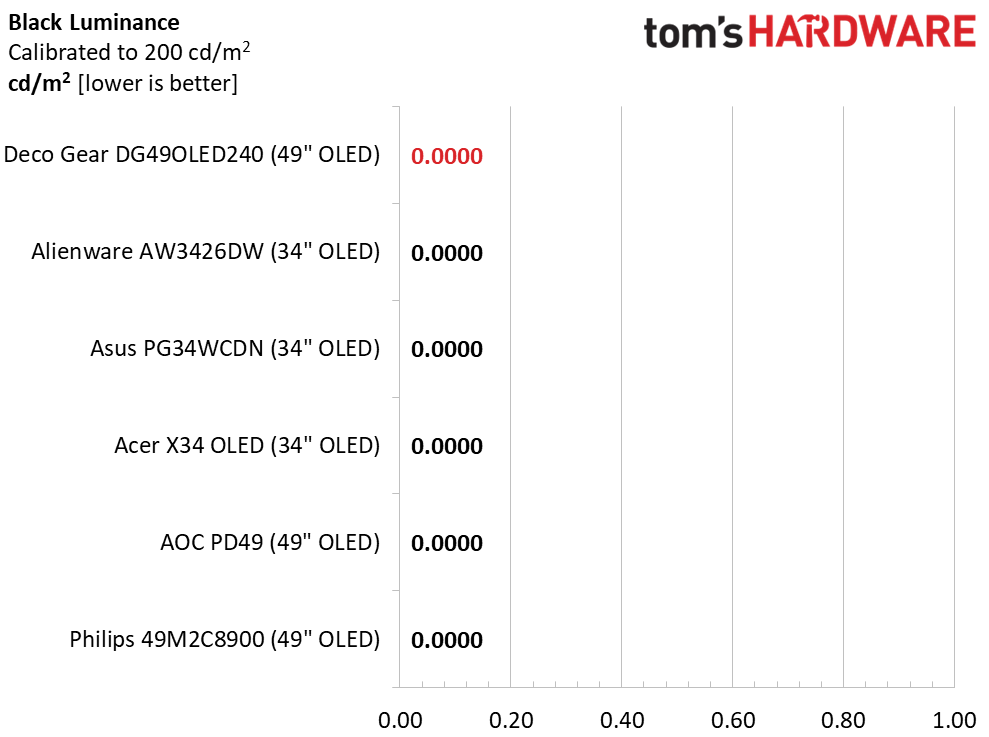
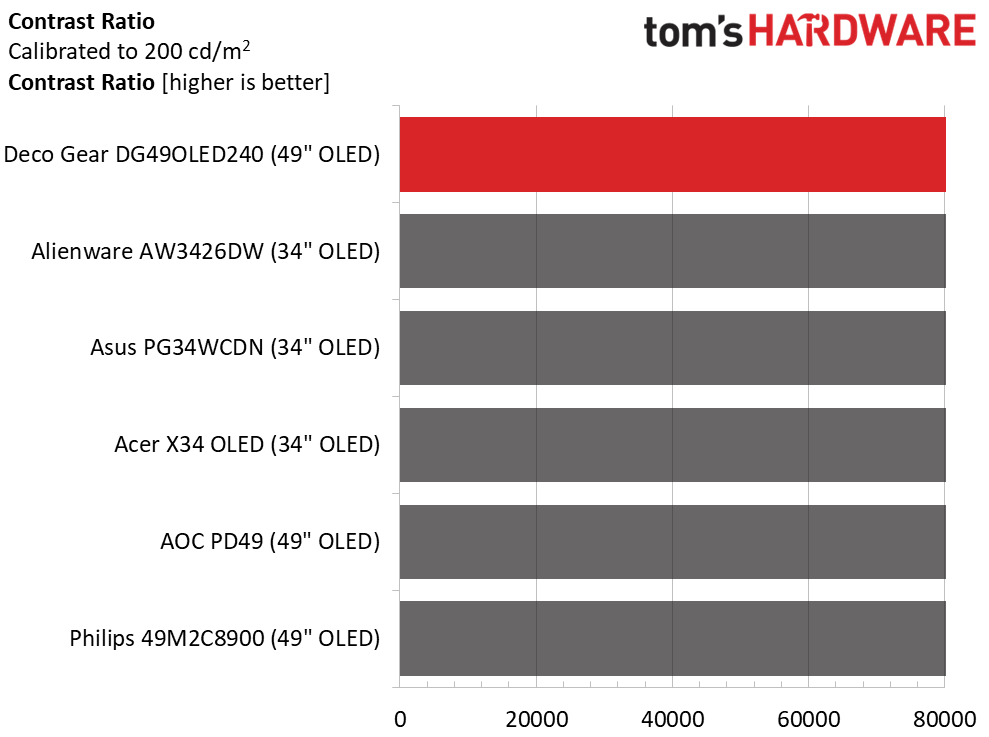
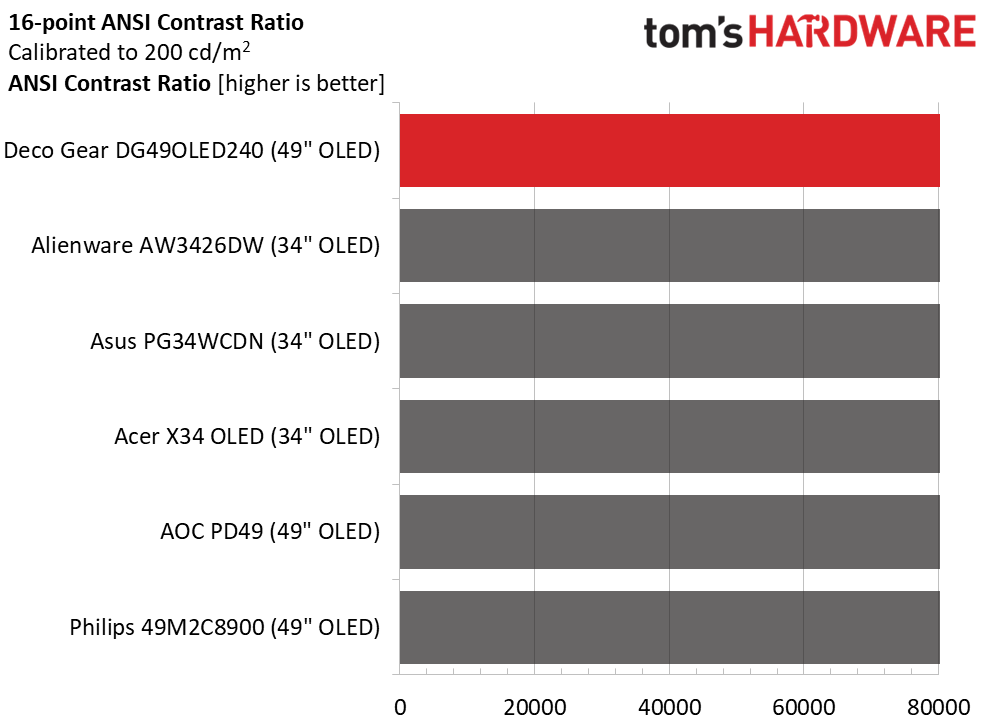
Calibration changes nothing except the peak brightness value. If you set Brightness Mode to Normal, that’s 79 for 200 nits. In Highlight, I set the peak with a 25% window, and that value was 45. Unfortunately, you must change the brightness setting every time you switch brightness modes. I find it best to use variable for gaming and video, and constant for work tasks. Black levels and contrast could not be measured in either the static or intra-image (ANSI) tests.
Test Takeaway: The DG49OLED240 delivers similar brightness, black level, and contrast performance to other OLED displays in the ultra-wide and mega-wide formats. It stands out for having a variable brightness option, but it doesn’t remember the different brightness settings when you switch back and forth. It offers plenty of peak output for any indoor environment and can go down to 50 nits peak for dark room play.
MORE: Best Gaming Monitors
MORE: How We Test PC Monitors
MORE: How to Buy a PC Monitor
The DG49OLED240 ships in its Standard picture mode, which can be used without calibration. It employs the full native color gamut, which covers over 112% of DCI-P3. An sRGB mode is available if you need it.
Grayscale and Gamma Tracking
Our grayscale and gamma tests use Calman calibration software from Portrait Displays. We describe our grayscale and gamma tests in detail here.
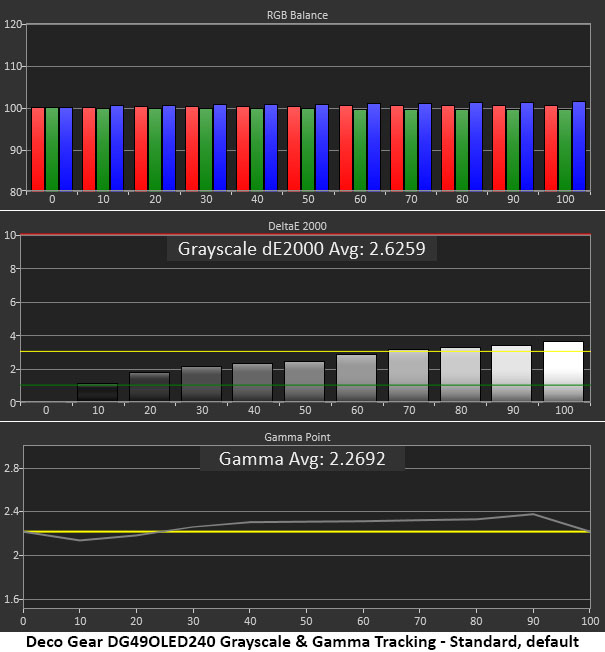
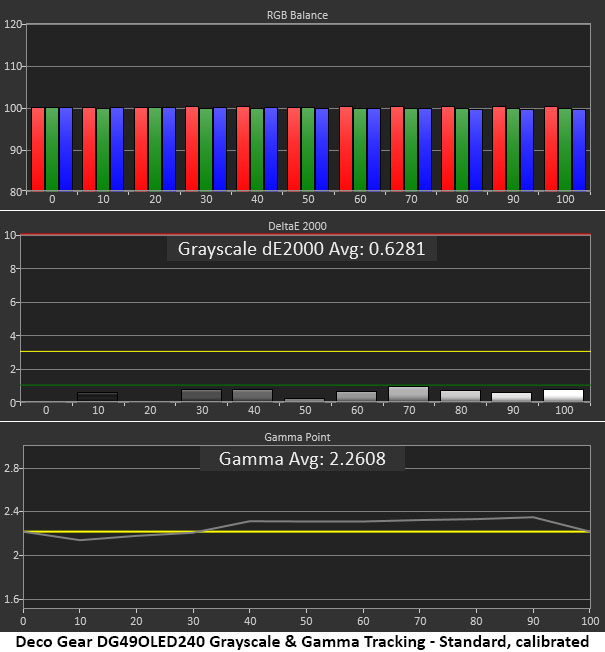
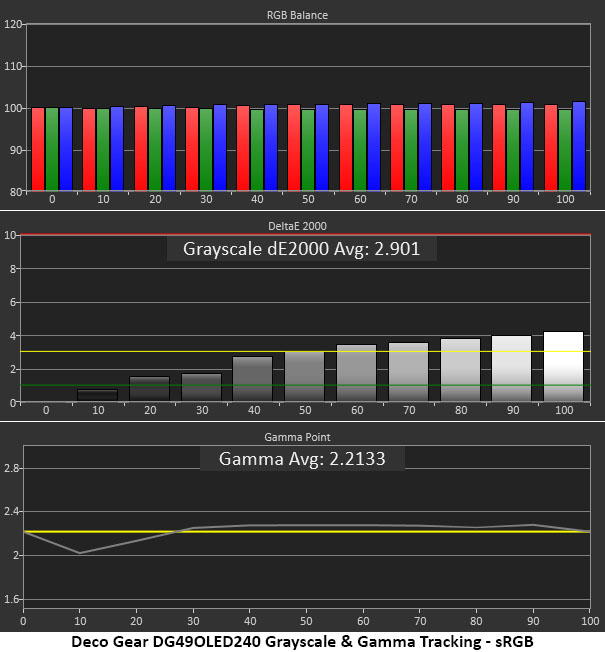
In the initial grayscale test, the DG49OLED240 shows almost no visible errors. Brightness steps above 70% just crack the 3dE threshold. You won’t see any issues in content, and the monitor is accurate enough not to require adjustment. I saw slight gamma variations in steps from 30 to 90% where the values were a little too dark. And there’s a slight dip at 10% where it’s too light. These are small errors, but gamma could be a little tighter.
Calibration brings all grayscale errors below 1dE, which is pro-level performance. Gamma is unchanged. It is possible to change the gamma as a whole, but there’s no way to straighten out the tracking line.
Interestingly, the sRGB mode has tighter gamma from 30 to 100%, where it’s only a tick above the reference line. There’s a slightly larger dip at 10%, which means shadow areas will be too light. Grayscale errors are just visible above 60% brightness. Calibration is possible here, something few monitors offer, and you can have independent settings for up to three color modes.
Comparisons
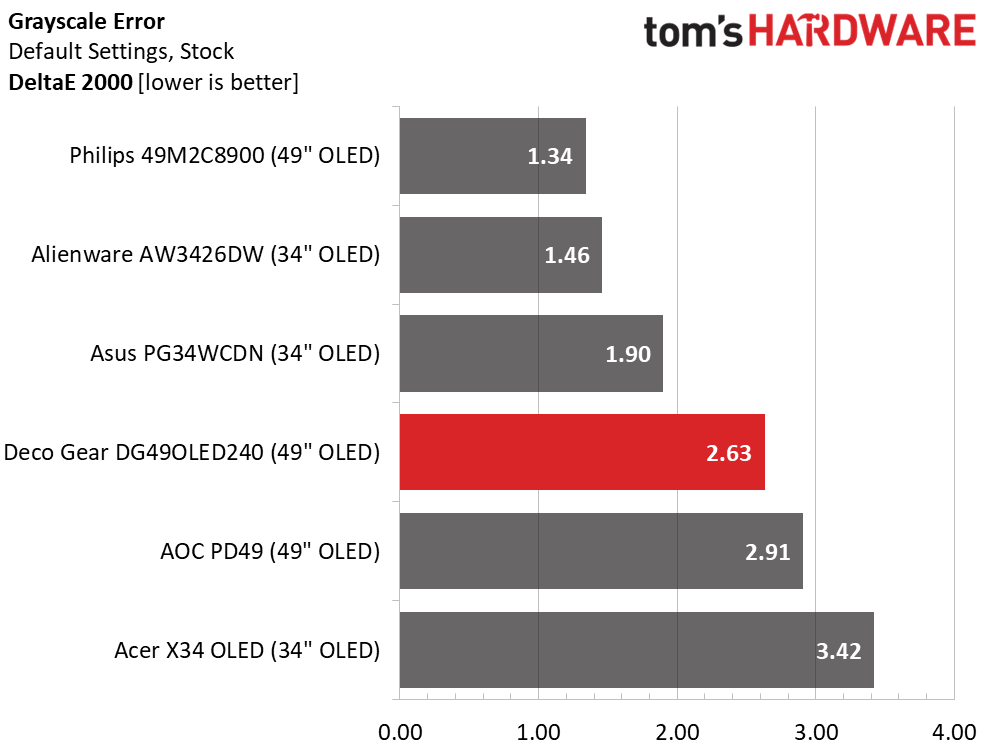
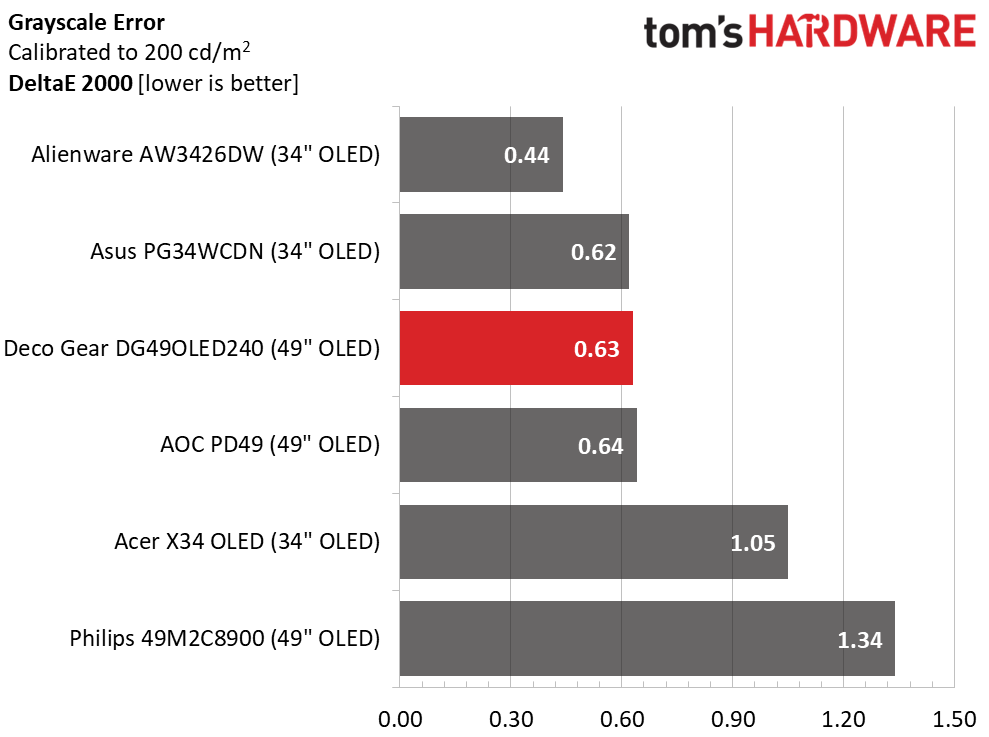
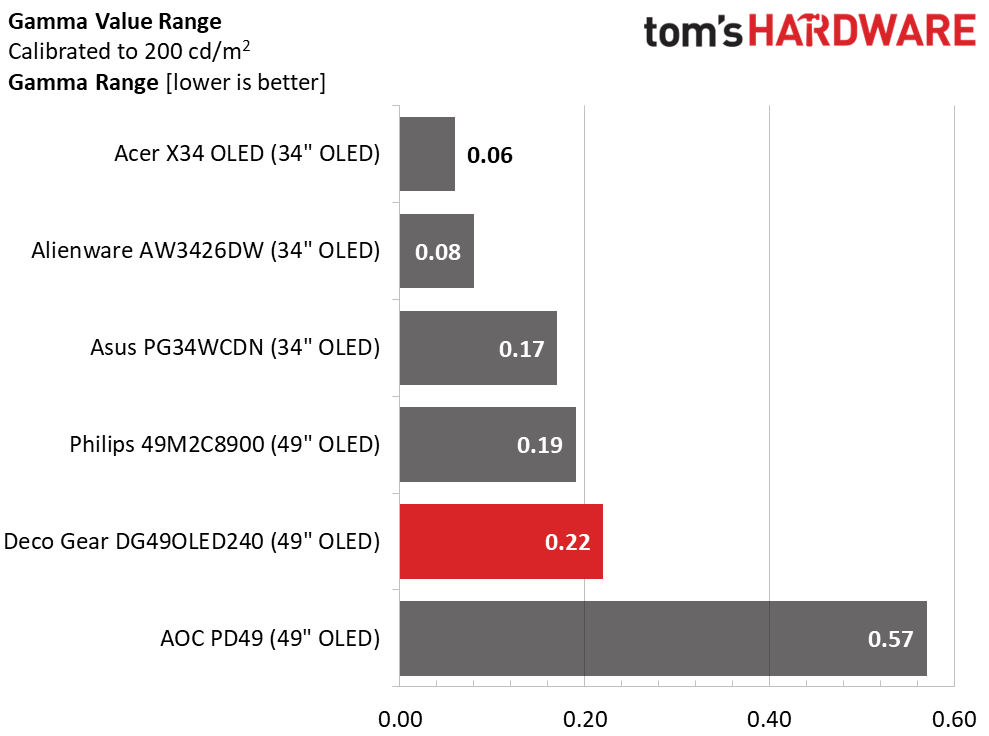
In the default test, the DG49OLED240 is mid-pack among a solid group of monitors at 2.63dE. You can enjoy it without calibration. After a few tweaks, the number falls to an excellent 0.63dE. With a range from 0.44 to 1.34dE, these screens are all visually perfect in the grayscale test.
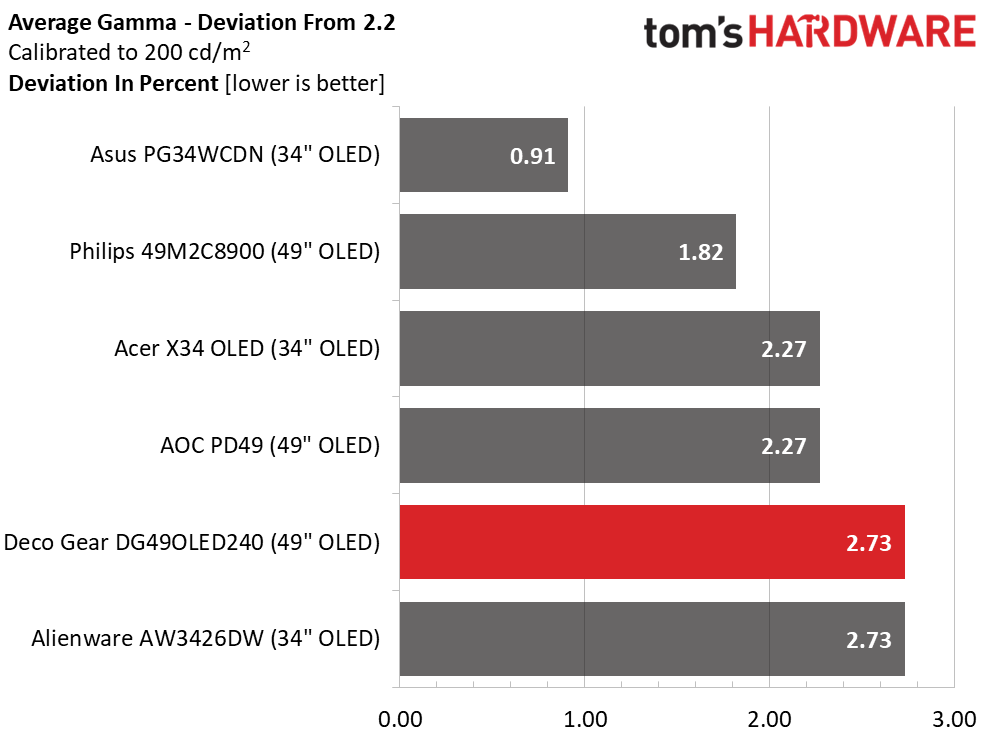
The DG49OLED240’s gamma is reasonably good, but it could be tighter. Most of the range runs on the dark side, which is forgivable in a monitor with infinite contrast like an OLED. The values span 0.22, while the deviation is 2.73%; the actual value is 2.26. This is very good performance.
Color Gamut Accuracy
Our color gamut and volume testing use Portrait Displays’ Calman software. For details on our color gamut testing and volume calculations, click here.
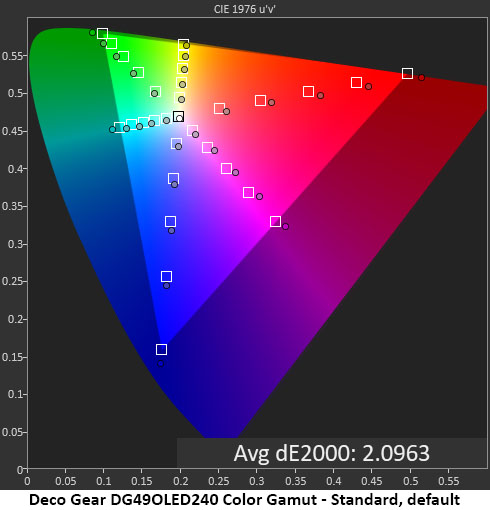
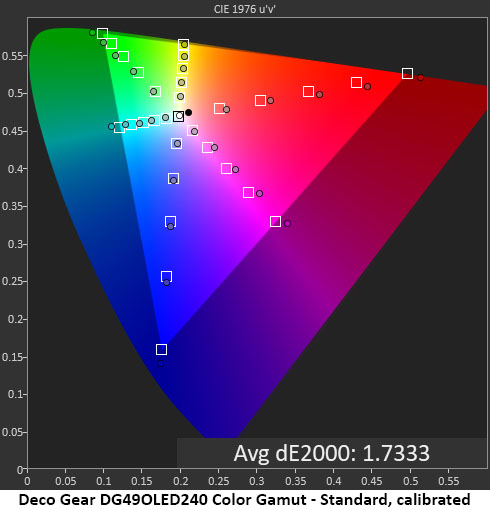
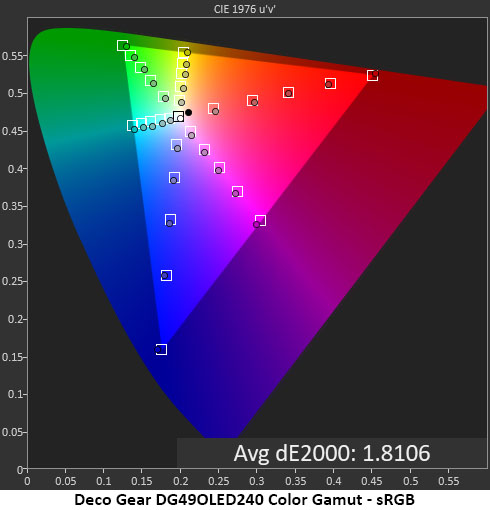
In the color test, you can see how the DG49OLED240 distributes its ample gamut with linear oversaturation and bonus color on all sides of the triangle. This creates a balanced image that doesn’t look overblown even though it covers over 140% of sRGB for SDR content. Hue points are on or close to target. Calibration only makes a slight difference, which is hard to spot in actual content. This is excellent performance.
sRGB is nearly perfect as well, with all points on target and a low 1.81dE average error. I didn’t calibrate sRGB for this test, so there is a slight gain potential to be had from a grayscale adjustment. This too is excellent performance.
Comparisons
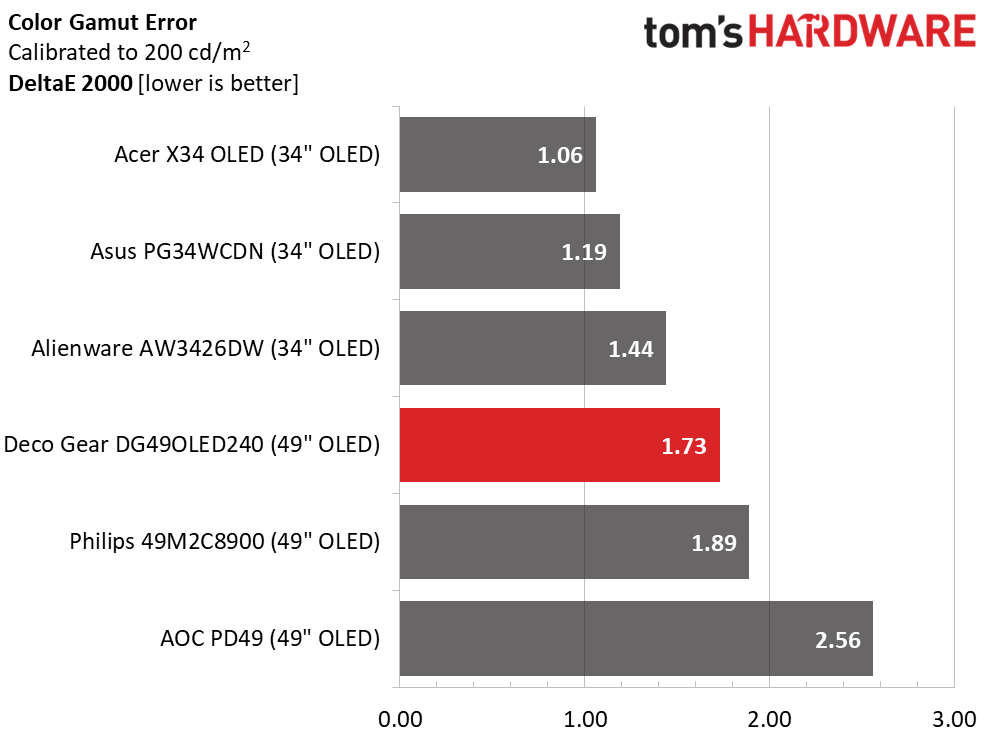
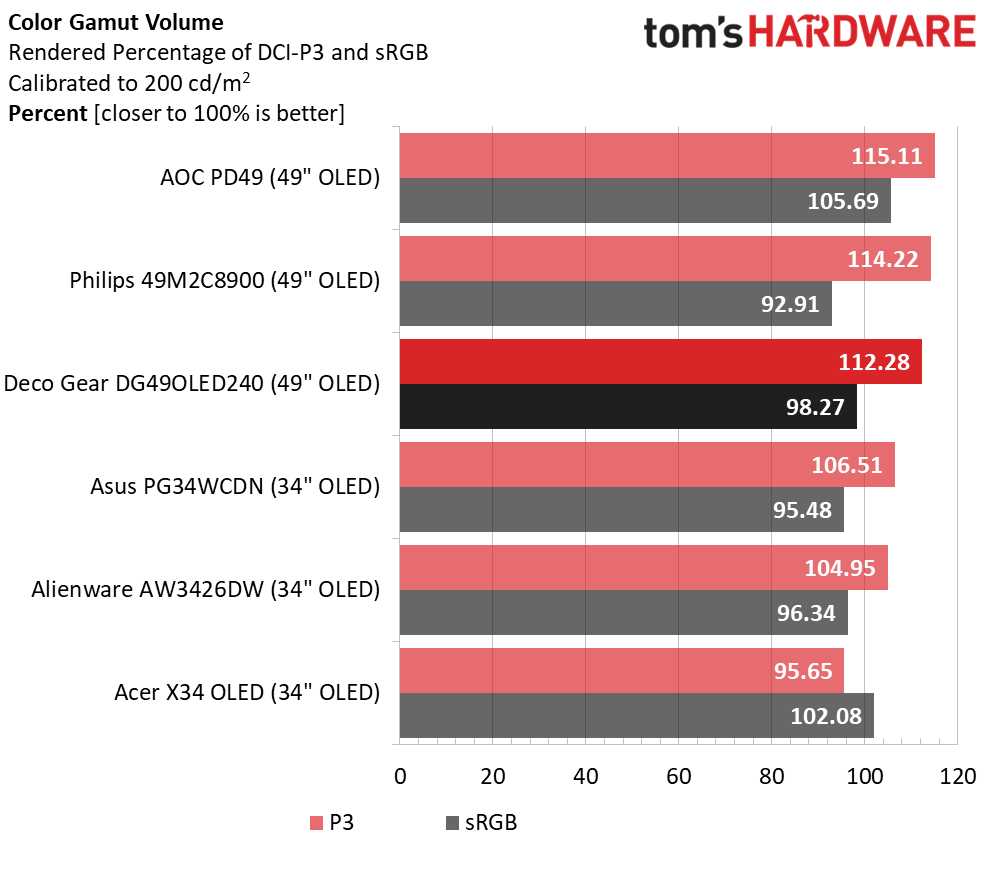
The DG49OLED240 again finds itself mid-pack among excellent displays with a 1.73dE average color error, well below the visible threshold. Where you can see a difference is in the volume test. It is on par with the other 49-inch screens and more colorful than the 34-inch displays. If you want a colorful monitor, the DG49OLED240 delivers with 112.28% coverage of DCI-P3. Its 98.27% coverage of sRGB is ideal for color-critical applications.
Test Takeaway: The DG49OLED240 is color accurate both out of the box and after calibration. With 112.28% coverage of DCI-P3, it is on par with other 49-inch OLEDs and more colorful than typical Quantum Dot 34-inch screens. It stands out with an adjustable sRGB mode that has a very accurate gamut. Gamma is a tad dark in all modes, but that is forgivable from an OLED thanks to its infinite contrast.
MORE: Best Gaming Monitors
MORE: How We Test PC Monitors
MORE: How to Buy a PC Monitor
Our HDR benchmarking uses Portrait Displays’ Calman software. To learn about our HDR testing, see our breakdown of how we test PC monitors.
The DG49OLED240 supports HDR10 signals with an automatic switch and two additional picture modes. All other picture controls are grayed out.
HDR Brightness and Contrast
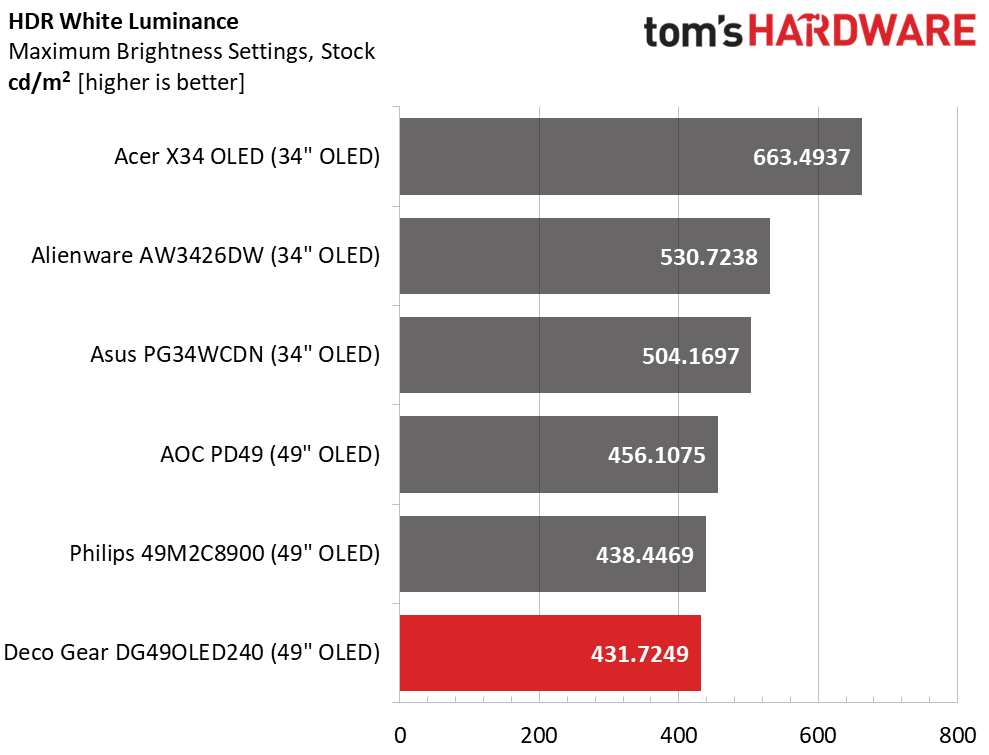
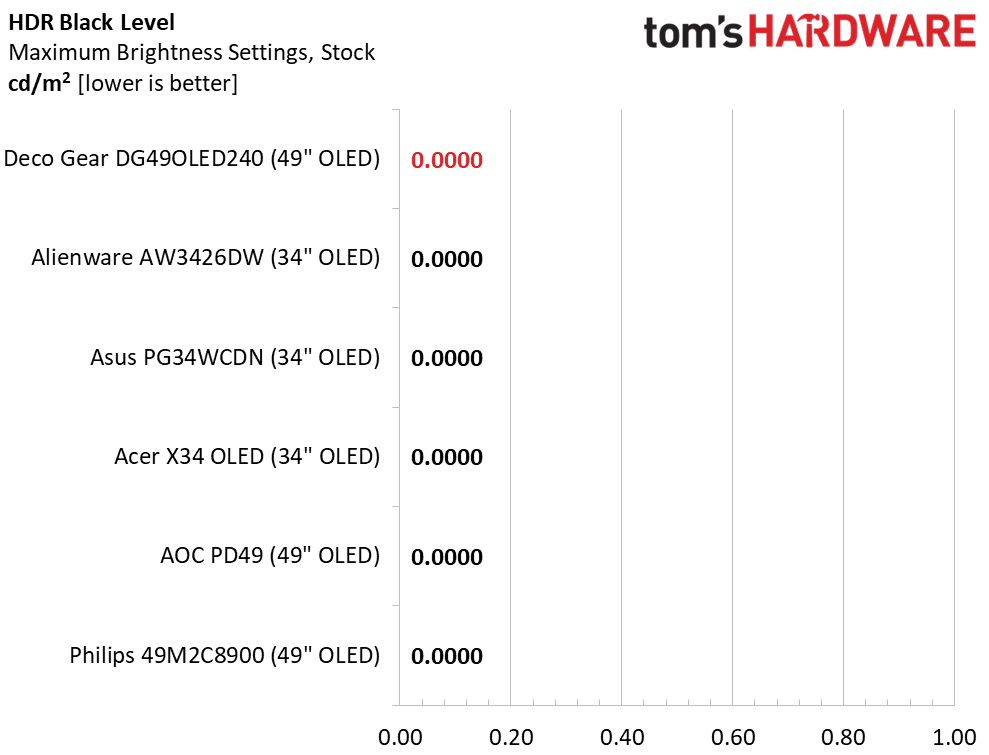
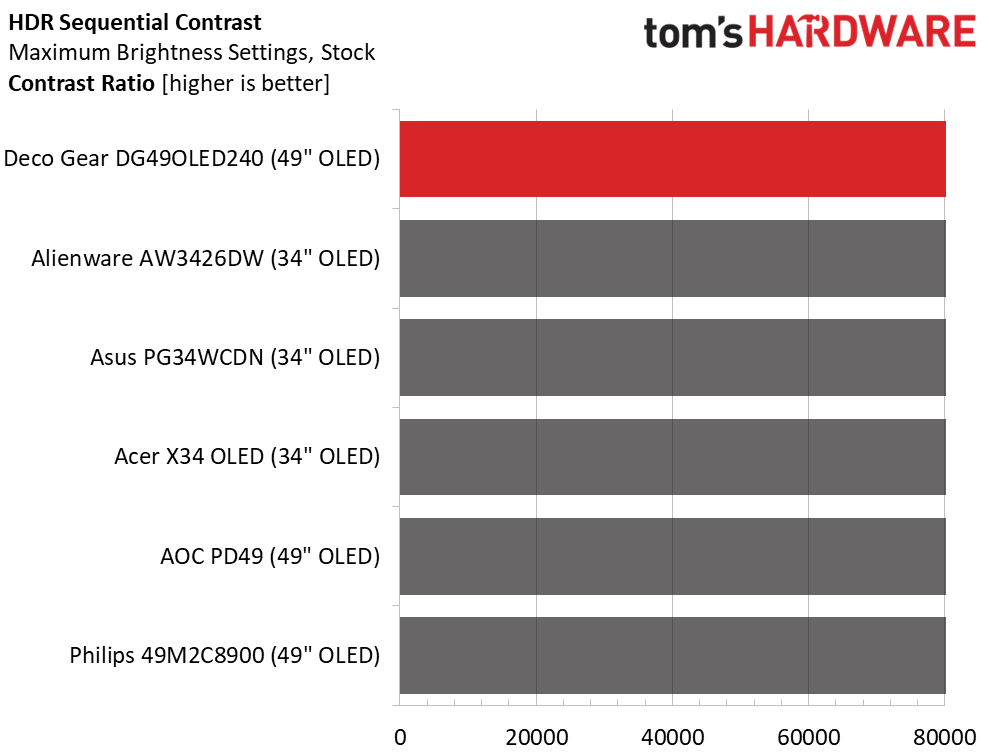
The DG49OLED240 offers about the same peak output for HDR as it does for SDR. There’s plenty of brightness and impact, but it’s a little below the other screens. The Alienware and Acer have visibly brighter HDR, but the Asus, AOC, and Philips are close to the Deco Gear. It is more than bright enough to earn its VESA DisplayHDR 400 certification. Black levels and contrast cannot be measured.
Grayscale, EOTF and Color
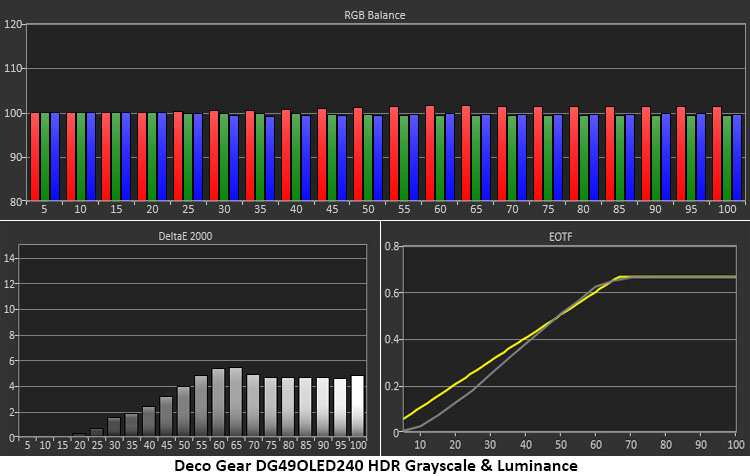
HDR grayscale is a tad warm in tone, but the errors are no more than 5dE. This won’t affect content too obviously, and red errors are easier to ignore. Tracking is linear, which is a good thing, and darker tones are well below 3dE. The EOTF rides a little dark up to 40% brightness, where it meets the reference line. The tone map transition is at 65%, which is correct for the measured black and white thresholds.
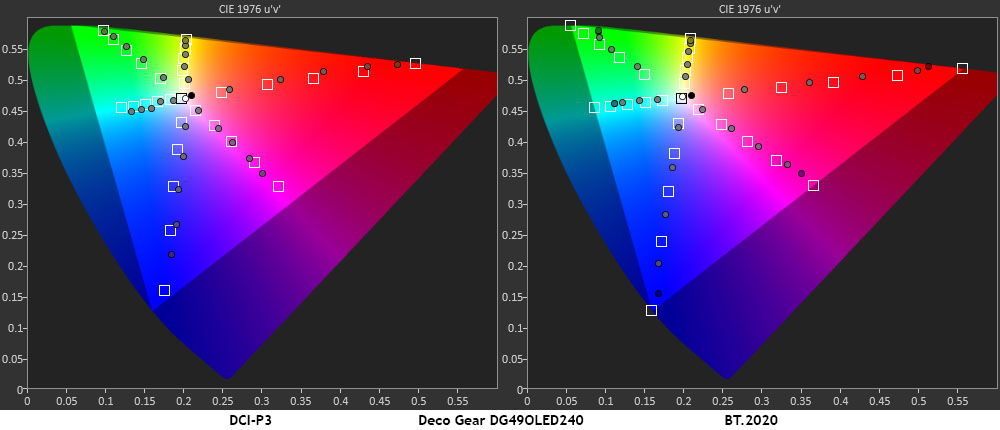
In the color test, the DG49OLED240 doesn’t quite use all its red primary in the DCI-P3 gamut. The other points are slightly oversaturated, which is typical of the HDR monitors I’ve tested. Hue points run in line with their targets and are also a tad oversaturated. In the BT.2020 test, there is a little more oversaturation up to where color runs out at 90% red, 75% green, and 95% blue. This is solid performance.
Test Takeaway: The DG49OLED240 delivers excellent HDR with an impactful and colorful image. Accuracy is on par with other 34- and 49-inch OLEDs. It doesn’t offer calibration for the HDR modes, but with only a slightly warm grayscale, that isn’t a problem.
MORE: Best Gaming Monitors
MORE: How We Test PC Monitors
MORE: How to Buy a PC Monitor
With so many users putting two or three monitors on their desks to increase screen area, it is surprising that there aren’t more 49-inch 32:9 displays available. If you consider that 27-inch QHD is extremely common with many choices for buyers, then why aren’t there more screens like Deco Gear’s DG49OLED240? I can only imagine it’s the expense. Though it’s a good value at $1,229.99, that is still more than two 27-inch QHD 16:9 OLEDs with comparable specs. But how much is it worth to you to ditch that vertical line that sits right in the center of your view?
As a gaming monitor, the DG49OLED240 is superb. That it is an OLED gives it an immediate advantage. It performs on par with most of the premium screens I’ve reviewed. It has smooth motion processing and very low input lag, which suits it well for competitive gaming. Serious players should give it a serious look.
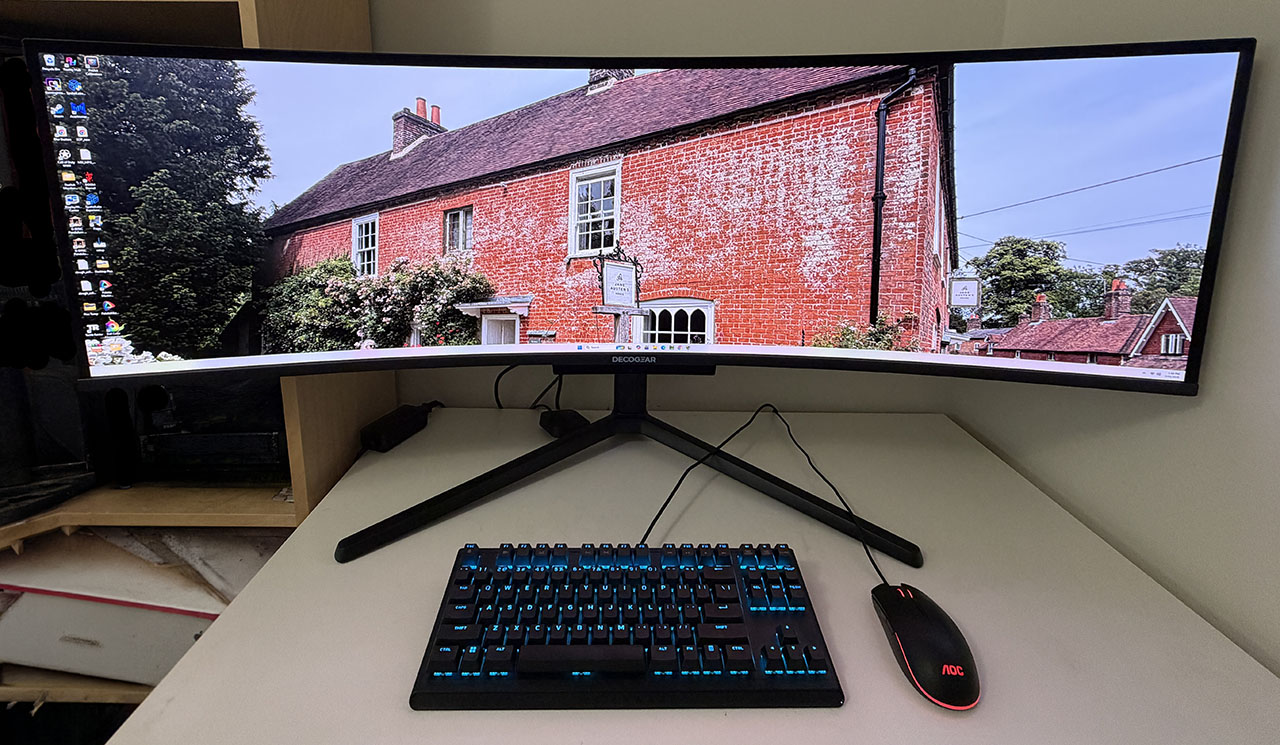
With a Quantum Dot layer, it delivers over 112% coverage of DCI-P3 color, which puts it slightly ahead of the other 49s I’ve tested. It’s accurate out of the box and improves slightly with calibration. Gamma was slightly askew, but color was exemplary. I also found more than enough brightness with healthy light levels over 430 nits and the usual unmeasurable OLED blacks and contrast. And if you’re concerned about text fringing, don’t be. My sample was free of that artifact. I also noted better-than-average sound thanks to the addition of a third speaker to fill out the bass. The DG49OLED240 can be enjoyed without headphones or external desktop speakers.
If you already have two 27-inch QHD screens, the Deco Gear DG49OLED240 is the perfect way to eliminate that dividing line once and for all. And if you’ve considered adding a second screen, it’s worth a look. If you have the space and the desire for a widescreen high-performance gaming OLED, definitely check it out.
MORE: Best Gaming Monitors
MORE: How We Test PC Monitors
MORE: How to Buy a PC Monitor